
Hush Minutes
Meeting notes that never leave your device.
It sits in the meeting with you and writes it down, using the AI Apple already built into your Mac, iPhone and iPad. A live transcript, then notes that write themselves when you stop. Nothing is uploaded, and there is nothing more to pay for the AI.
Coming soon to the Mac App Store, with iPhone and iPad to follow. One purchase covers all three. One email on launch day, nothing else. See what it does

Watch it work
A meeting, from
first word to notes.
This is the whole thing, sped up. Nothing in it touches a server.
Written on this Mac by Apple's model
Summary
The estimate came to $4,800 with gutters, higher than planned. Metal gutters were chosen, and the work is aimed at the second week of October.
Decisions
- Go with metal gutters rather than vinyl.
- Aim for the second week of October.
Action items
- Sam: send the itemized estimate by Friday.
- Me: send the deposit once it arrives.
On-device intelligence
You already own
the AI.
Apple builds speech and language models into every recent Mac, iPhone and iPad. Hush Minutes puts them to work on your meetings. There is no other AI behind it, and no bill for using it.
It runs on your device's own chip
Transcription and note writing happen on the Mac, iPhone or iPad in front of you, using models that come from Apple as part of the system.
No fees for the thinking
No API key, no credits, no price per minute. You paid for the AI when you bought the device.
Security you do not have to audit
A meeting that never leaves your device cannot be breached on a server, mined for training, or handed to anyone. Private Cloud Compute is never used.
Mac, iPhone and iPad
Wherever the
meeting happens.
On a call at your desk, around a table, or standing in a client's kitchen. The same notes, written the same private way, on the device you have with you. One purchase covers all three.
On the Mac
Both sides of a call, heard from the Mac itself with no bot joining. A recorder in the menu bar, an assistant that answers from your calendar while you talk, and every export. In App Review now.
On iPhone
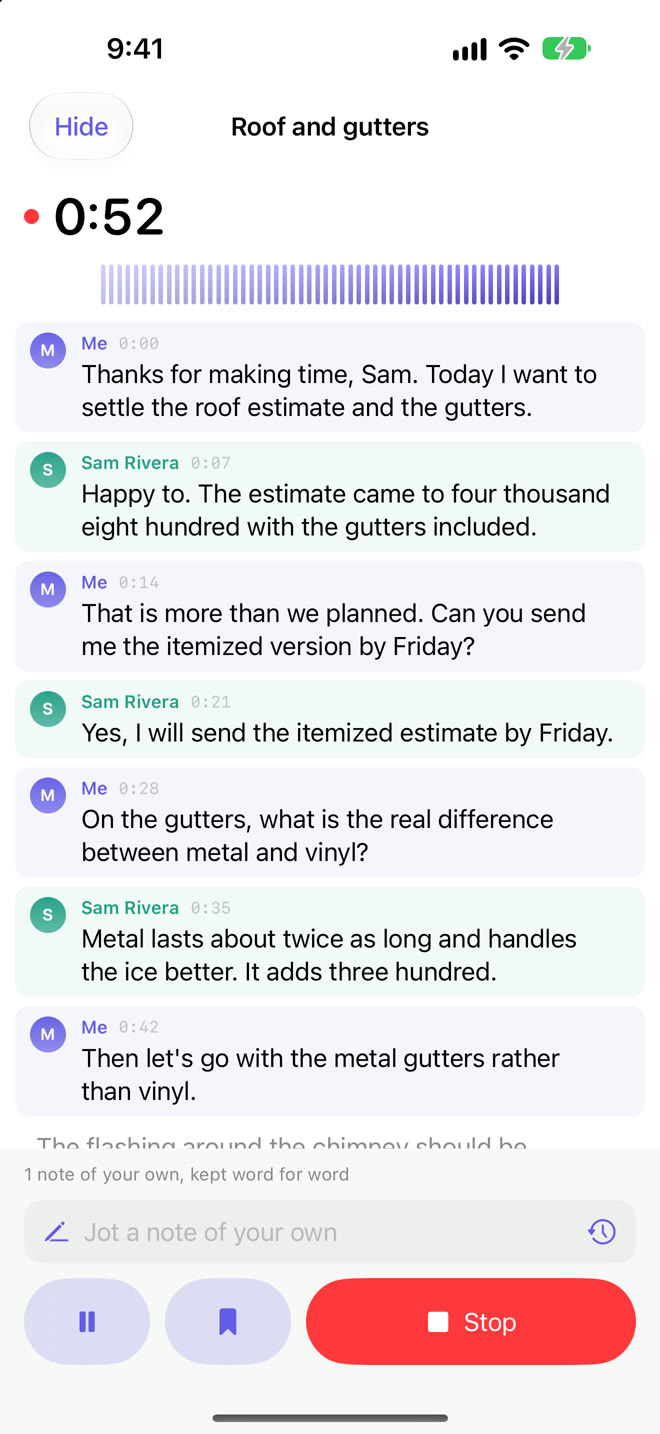
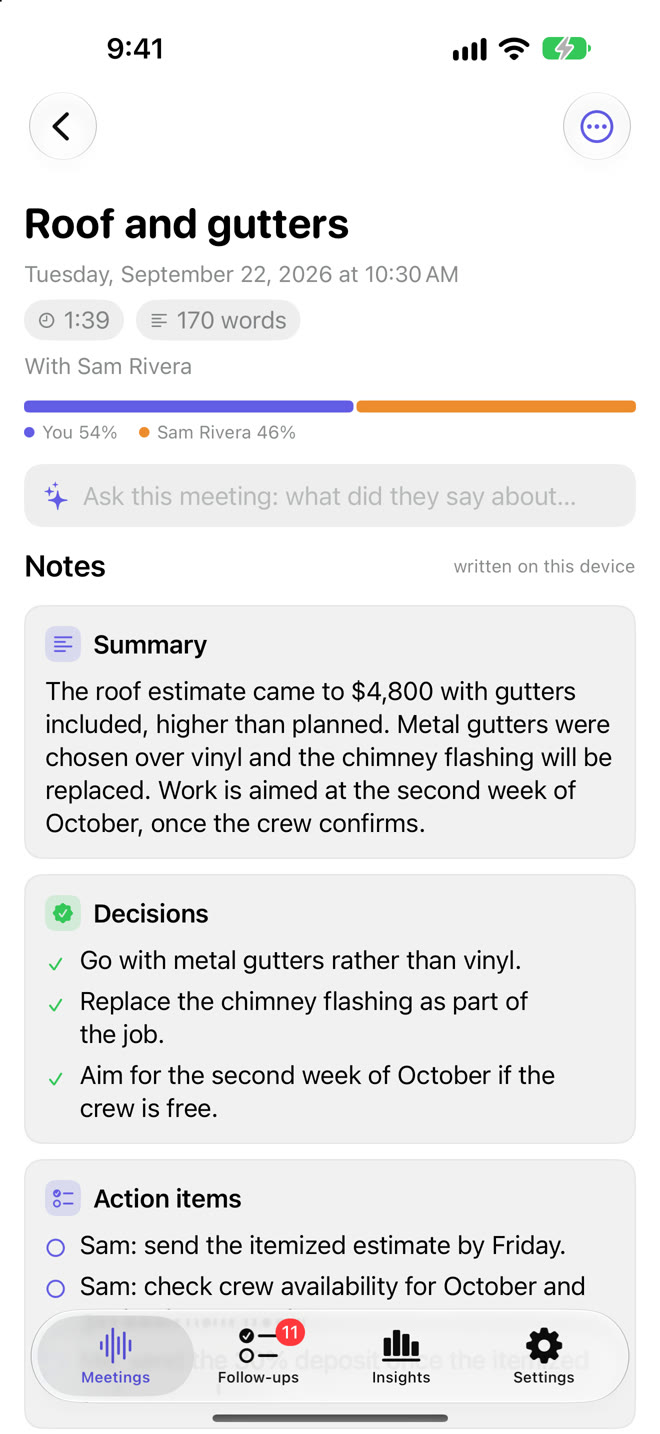
Put it on the table and press Record. It keeps listening with the screen off, tells the voices in the room apart, and writes the notes when you stop. Coming soon.
On iPad
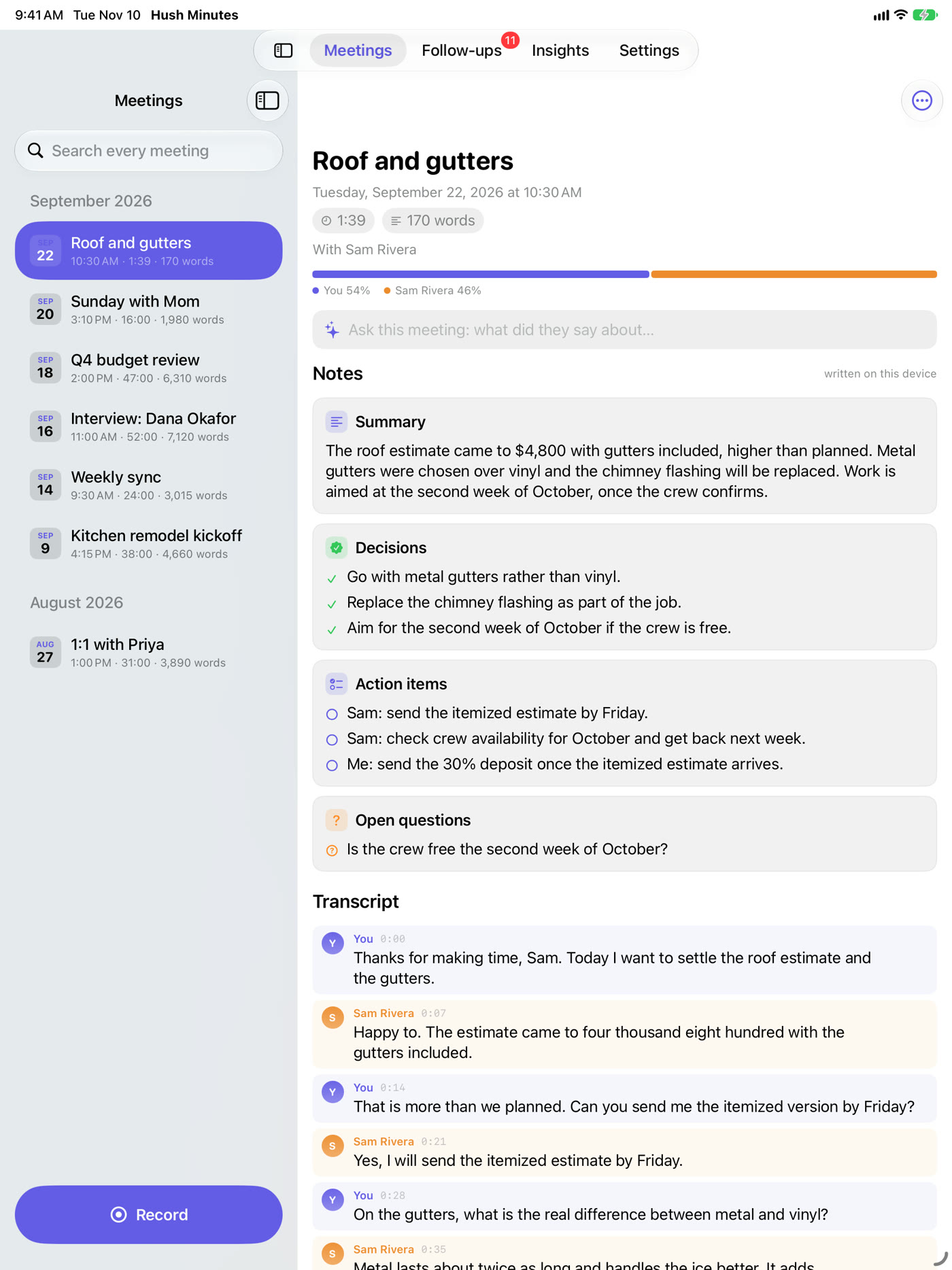
The list of meetings beside the one you are reading, made for the bigger screen. Follow-ups, people and insights are all there. Coming soon.
An iPhone or iPad cannot hear the other side of a phone or video call; that is the Mac's job. If you want your meetings on every device, you can switch on your own iCloud on iPhone and iPad. It is off unless you turn it on.
What it does
Everything a meeting
leaves behind.
Press Record and talk. The speech and language models already built into macOS do the rest.
Live transcript
Every line knows who said it.
Your microphone and your Mac's sound are transcribed separately, so lines say you or them. Two people on one microphone are told apart by voice.

Private by design
Nothing to trust, because nothing is sent.
No server, no account, no analytics.
Your own notes
Jot a line. The notes lean on it.
Type what matters while people talk. Each note is stamped with its moment, kept word for word, and given to the note writer as what counts most to you.
A clean transcript
The ums go. So does anything you say must never be written.
Hesitations are removed as you speak. Swearing can be masked, card and ID numbers redacted, and words you list never reach the disk.
The card is [redacted] and, keep [redacted] quiet.
Notes
They write themselves.
Summary, decisions, action items and open questions, using only what was said. Formal minutes when you need them.
Follow-ups
Nothing said in passing gets lost.
Promises are listed as they are made. "I'll send that Friday" becomes a reminder due Friday. Every open item from every meeting sits in one list.

People
Who is waiting on whom.
Everyone you have met, with what is yours to do and what you are waiting on from each. Tick things off as they land.

Lock
Touch ID before anyone sees a word.
Locks when it opens, when the screen locks, and after five minutes away. Never during a recording.
Your own templates
Notes in the shape your work has.
Seven kinds of meeting are built in. Name your own and its sections, and the notes follow.
The week
Seven days, one page.
Everything decided, everything still to do and every question left hanging, gathered from your notes.
Export
Take it anywhere.
PDF, subtitles, plain text, Markdown, a recap email, or straight into Reminders.
Menu bar
Record without leaving what you are doing.
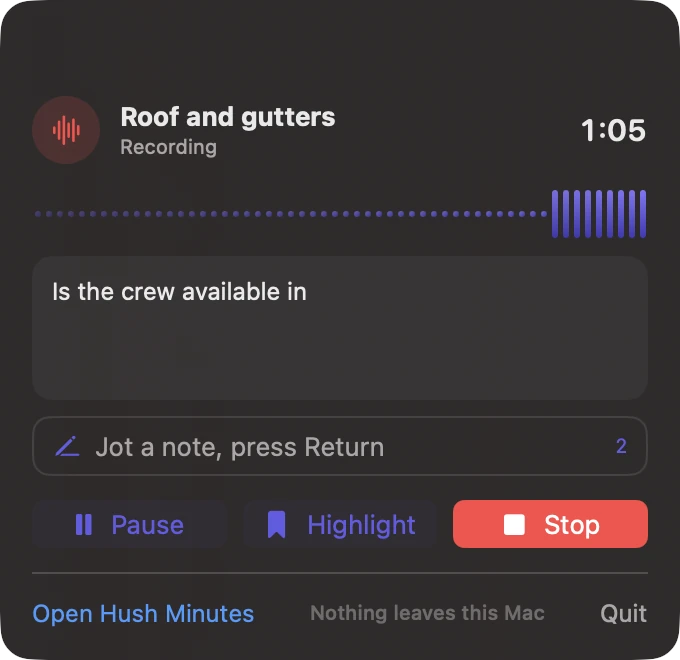
Start, pause, highlight, jot and stop from the menu bar, with the line being spoken in view. The clock sits beside it while you record.
On-device AI
Powered by the intelligence your Mac already has.
Apple's own speech and language models, running on your Mac. Nothing to sign up for, nothing metered, nothing sent out.
The assistant
Ask while you talk.
It already knows.
Type it, or say "Hey Hush". Answers come from your own calendar, your Reminders and every meeting you have kept.
From your calendar
"Do I have anything at 2 tomorrow?" is answered before the pause gets awkward.
From past meetings
When they ask what was agreed last time, the exact quote appears on its own.
A brief before you start
Type who you are meeting. What was left open with them, and what you still owe, comes up.
Afterwards
A meeting you can
actually go back to.
Talk time, chapters, notes and the full transcript, in a folder of plain Markdown that is yours.

Ask any meeting
"What did they say about the deposit?" is answered with the words that were said.
Edit and import
Correct a title, the notes or any line. Bring in a recording you already have.
On your other devices
Keep the folder in your own iCloud Drive and macOS keeps it in step. The app still uploads nothing.
Insights
See what your meetings
add up to.
Hours week by week, how much of the talking is yours, who you meet most, and how many promises were kept. Counted on your Mac, from your own meetings.

Catch Me Up
Looked away? One press gives you the last few minutes in three lines, and any question that was put to you.
A decisions log
Every decision from every meeting in one list. Type a word and find when it was settled.
Translate the notes
Into another language, on your Mac, by Apple's own translation.
Privacy
Most meeting tools send your call to someone else's computers. Hush Minutes has nowhere to send it. The transcript and the notes are made on your Mac, by the models Apple ships with macOS, and they stay there.
On your Mac only
No audio, transcript or note is sent anywhere, not even to write the notes. Private Cloud Compute is never used.
No account, no tracking
Nothing to sign in to. No analytics, no crash reports, no ads. The App Store label is Data Not Collected.
Only while recording
The microphone is used while Record is on. Audio is discarded after transcription unless you ask to keep it.
Redacted before it is saved
Words and numbers you mark never reach the transcript file, so there is nothing to scrub later.
Calendar, if you allow
Calendar and Reminders are asked for once, read on the Mac, and go nowhere.
Files, not a service
Stop using the app and your notes are still there, readable in any editor.
Compare
The meeting stays
in the room.
| Hush Minutes | Cloud notetakers | |
|---|---|---|
| Where your words are processed | On your Mac | On the vendor's servers |
| Account | None | Required |
| Cost | US$29.99, once | A subscription, usually per person per month |
| Limits on minutes | None | Common on free and lower plans |
| Works offline | Yes | No |
| Works with any call app, and in person | Yes | Depends on the integration |
| Redaction before anything is stored | Yes | Your audio has already left your Mac |
| Your notes | Markdown files in your folder | Inside the vendor's service |
"Cloud notetakers" describes how services that transcribe on their own servers generally work. Each one differs, and they change; check the one you are considering.
Price
One price. Yours for good.
US dollars, once, on the Mac App Store.
- Every feature
- No subscription
- No in-app purchases
- No limit on meetings
- English and Spanish
Coming soon to the Mac App Store. We email you once, on launch day.
What you need
Made for the devices
you have.
macOS 14 or later
Apple Silicon and Intel. On macOS 14 and 15 the older on-device recogniser does the transcription.
Best on macOS 26
A much better on-device transcriber, and with Apple Intelligence on, Apple's on-device model writes the notes.
iPhone and iPad
iOS 26 or iPadOS 26 and later. On a device with Apple Intelligence, Apple's on-device model writes the notes; on others, simple rules do.
Without Apple Intelligence
Notes are still written, by simple rules that pick out decisions and commitments. They are plainer, and say so.
Questions
Good things to ask first.
Does anything leave my device?
No, unless you ask it to. The app makes no network request of its own. Transcription and note writing both run on your Mac, iPhone or iPad using models that ship with the system. It never uses Apple's Private Cloud Compute or any other server. The one exception is yours to choose: on iPhone and iPad you can switch on "Keep meetings in my iCloud", which keeps them in your own iCloud Drive so your other devices have them. It is off by default.
Is there an iPhone and iPad version?
It is on the way. The Mac version is in App Review now, and the iPhone and iPad version follows. It is one purchase: buy it once and it is yours on all three. On iPhone and iPad it records the room you are in; it cannot hear the other side of a phone or video call, which only the Mac can do.
Do I pay for the AI, or need an API key?
No. Hush Minutes uses the speech and language models Apple builds into your Mac, iPhone and iPad, which run on the device itself. There is no account, no API key, no credits and no charge per minute. On a Mac without Apple Intelligence, the notes are written by simple rules instead and say so.
How does it hear the other side of a call?
Switch on "Both sides" and macOS asks for the Screen Recording permission once. That is how macOS lets an app hear what the Mac is playing. No picture of your screen is taken or used.
Which call apps does it work with?
Any of them, because it does not join the call. It listens to your microphone and to the sound your Mac plays. It works just as well for a meeting in a room with no call at all.
Can it tell speakers apart?
On a call, lines are marked as you or them, and you can type the other person's name. Two people sharing one microphone are separated by their voices and you can name each voice. Clearly different voices separate well; very similar ones may not, and a phrase too short to judge is left unlabelled rather than guessed.
What exactly does the clean-up remove?
Hesitation sounds such as um, uh and er, and stammers such as "the the". That is on by default and can be turned off. Masking swearing, redacting card and ID numbers, and redacting your own list of words are each off until you switch them on. Redaction is by matching words and number patterns, so check anything critical. The speaking coach still counts your ums.
Is translation private too?
Yes. Notes are translated on your Mac by the translation Apple builds into macOS, on macOS 15 or later. Hush Minutes sends nothing. The first time you use a language, macOS itself may ask to download it.
What does the lock protect?
It keeps the app closed to someone sitting at your unlocked Mac: nothing of any meeting shows until Touch ID or your Mac's password is given. It does not encrypt the files. Those are plain Markdown in your folder, protected by your Mac's own login and by FileVault if you have it on.
Can I redact something after a meeting?
Yes. A meeting's Actions menu can take a word or name out of the transcript, the notes and the minutes. It cannot be undone, and if you kept the audio, the audio still has it.
Can I get my meetings on my other devices?
Yes. Choose "Use iCloud Drive" and pick a folder there; macOS keeps it in step through your own iCloud account, and the Markdown opens in Files on iPhone and iPad. The app itself still uploads nothing. To keep meetings on one Mac only, choose a folder iCloud does not sync.
Which languages?
The languages Apple's on-device transcriber supports on your Mac. The app itself is in English and Spanish. The clean-up word lists are English.
Is the audio kept?
Not unless you turn on "Keep the audio file". With it on, every transcript line gets a play button that jumps to that moment.
Should I tell people I am taking notes?
Yes. Laws on recording conversations differ from place to place, and telling people is the right thing to do everywhere.
How do I get help?
Write to support@hushminutes.com. The support page covers setup and the common questions.